For POS distributors and ISOs

A restaurant POS you can sell as your own.

SodiumPOS runs tables, tabs, quick service, online orders and delivery apps on one Android tablet. Put your brand on it, set your price on top of ours and bring your own processing. We look after the software and your merchants' support calls.

  • Your brand, your pricing, your processing
  • Live merchant support 9am to 9pm by phone, email and chat
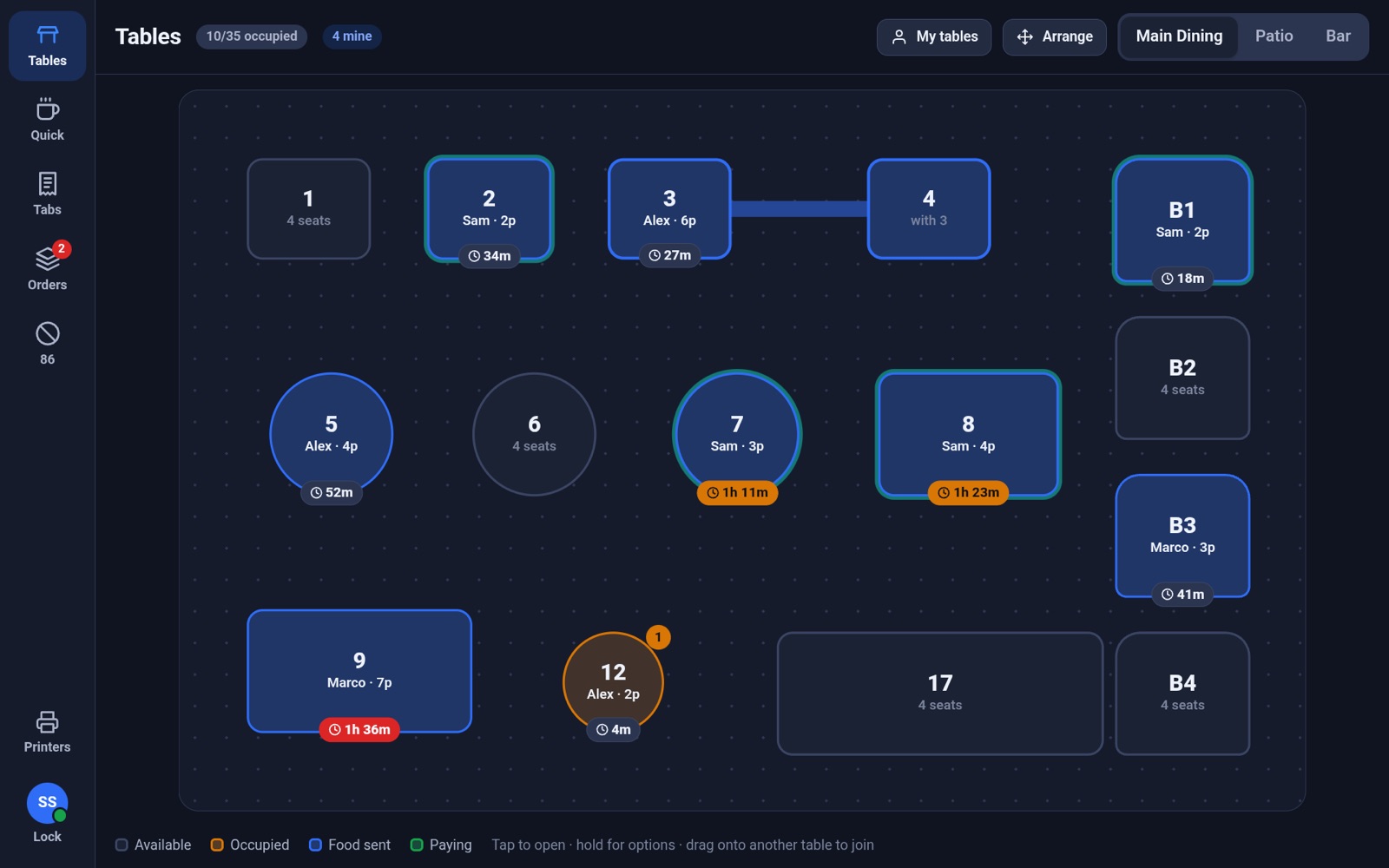
POS floor plan: tables colored by status with server names, guest counts and seat timers, and two joined tables
Built for
  • Full-service dining
  • Bars & tabs
  • Cafés & counters
  • Pickup & delivery
  • Multi-terminal floors

Features

Everything your merchants need on a Friday night

Every screenshot on this page is the real product running on a tablet, shown here under one of our distributors' brands.

See the whole room at a glance

A live floor plan shared by every terminal. Each table shows who has it, how many guests, and how long they've been seated.

  • Seat timers turn amber at an hour and red at 90 minutes
  • Drag one table onto another to join them, in groups of any size
  • Arrange mode moves tables for tonight; one tap resets to your saved layout
  • One party per table, enforced across terminals, so nobody double-seats
Live floor plan with seat timers

Ring it in the way the kitchen needs it

Modifiers that can't be gotten wrong, and coursing that lets servers send each course when the table is ready.

  • Required choices, nested options ("Add a side" → "Which side?"), and NO / LIGHT / EXTRA / SIDE
  • Free-quantity rules like "first syrup free", plus per-option limits
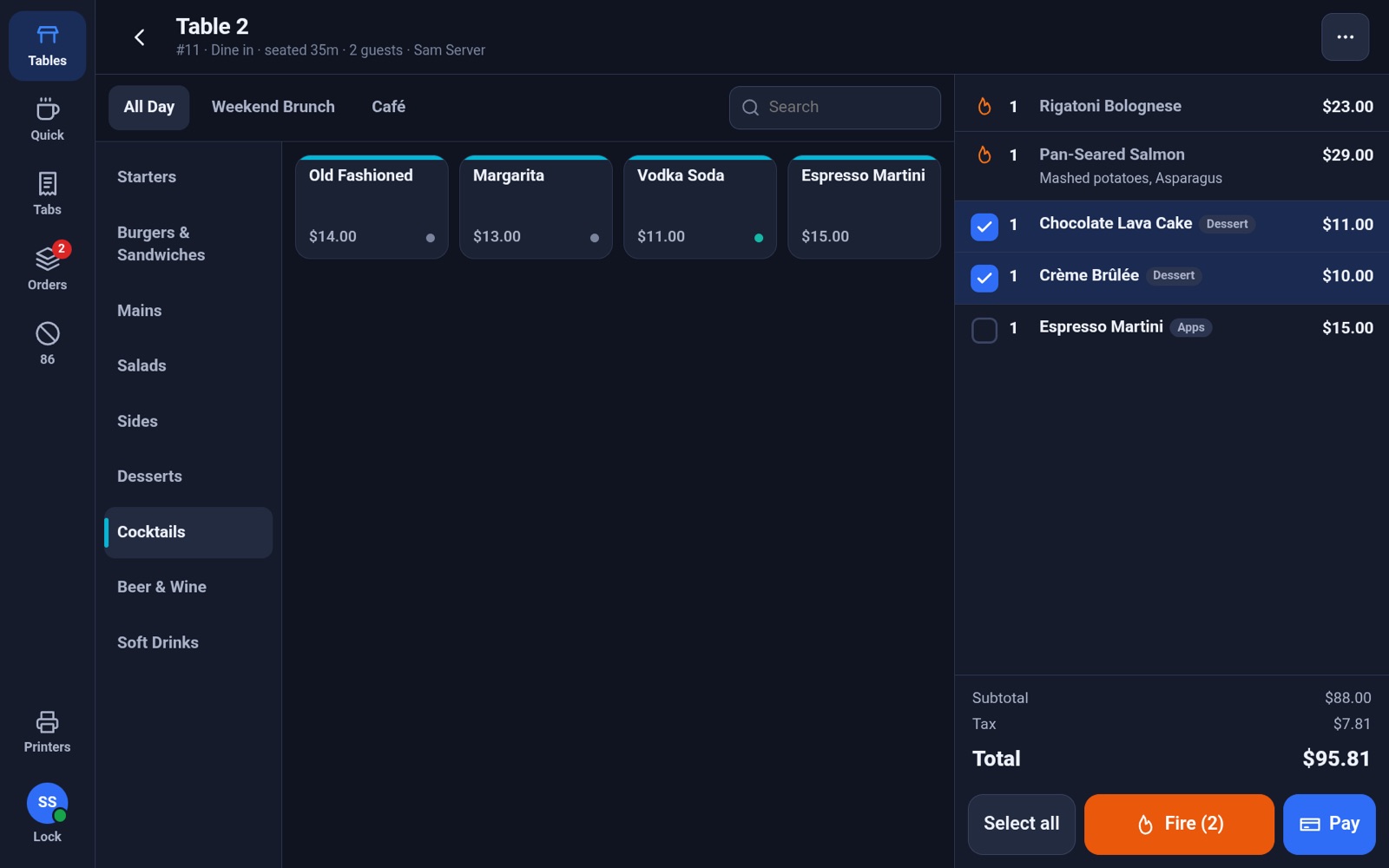
  • Seats, courses and notes on every line; tap lines and Fire only what's ready
  • Voids of sent items print a VOID ticket to the same station
A table's ticket with sent items and two desserts selected to fire

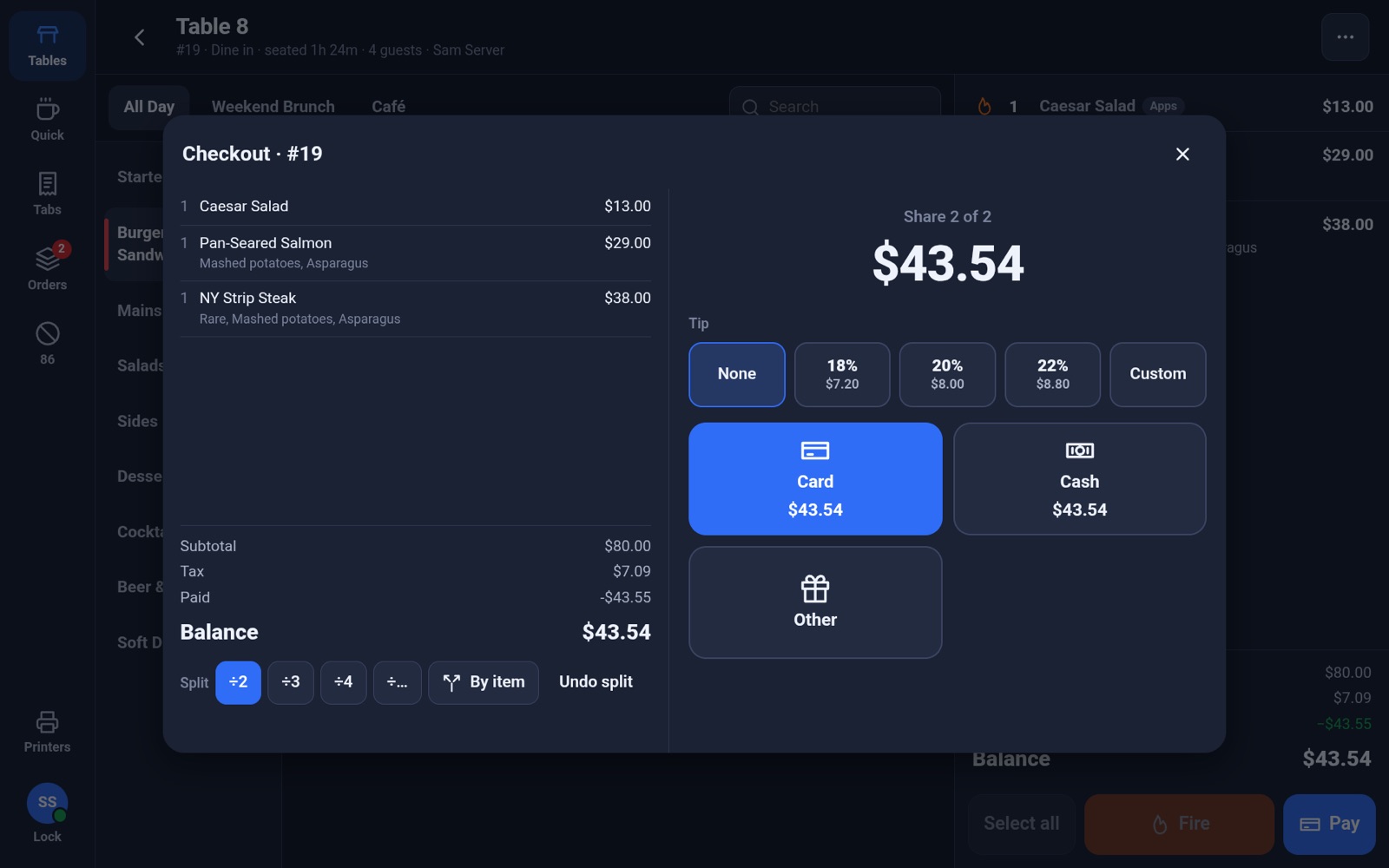
Checkout that handles real tables

Split it however the table wants, take tips on screen or on the slip, and close out at the end of the night.

  • Split evenly or by item; tax and gratuity always add up to the penny
  • Card, cash, card on file, gift card or any other tender
  • Tips entered later from the signed slip, then closed out in one tap
  • Auto-gratuity for large parties, card surcharge, tax-exempt orders
  • Receipts by email, text or print
Checkout showing share 2 of 2 on an evenly split check

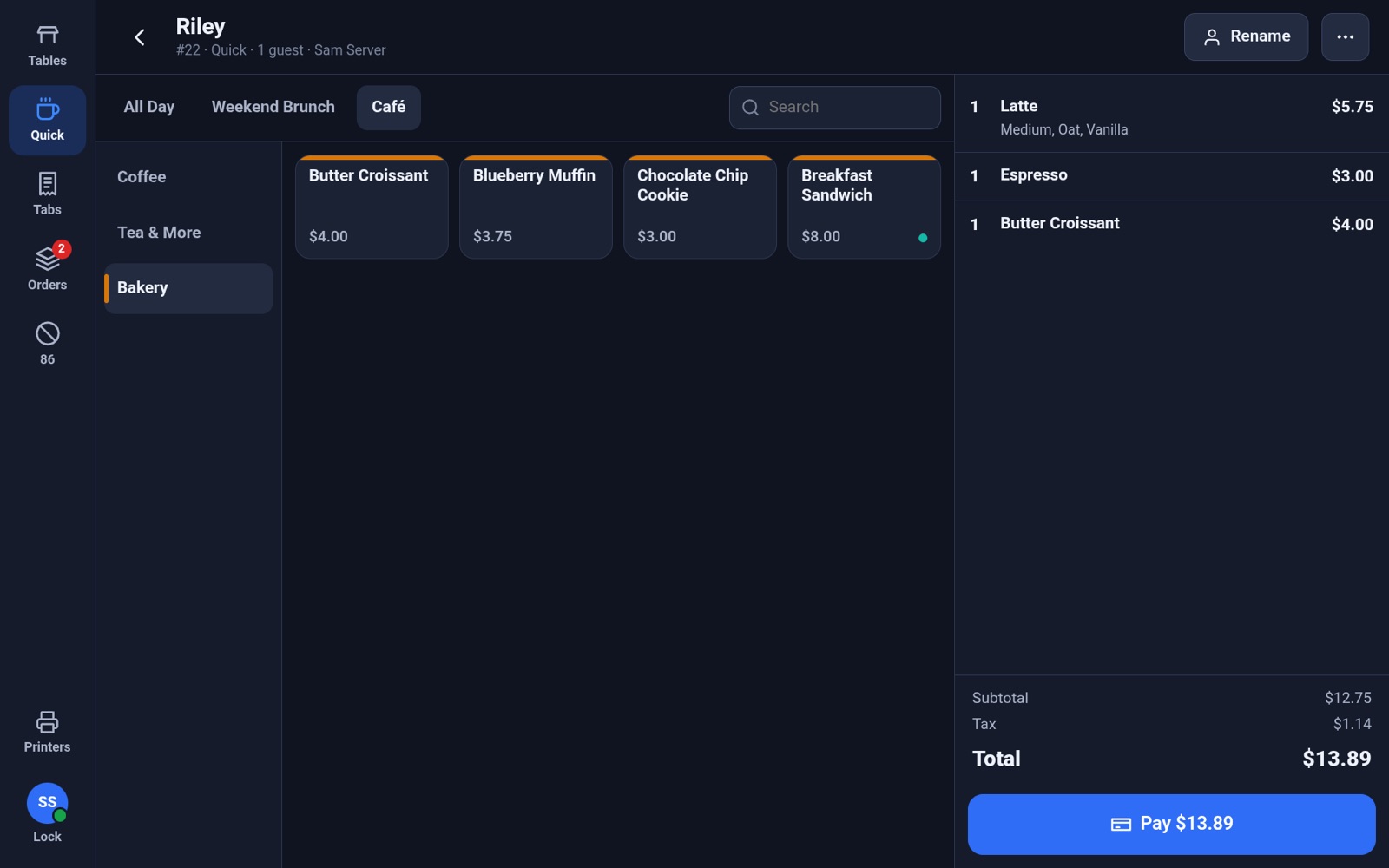
Quick service without the wait

A counter register with big targets for a line out the door. Every order gets the guest's name, and it prints on the kitchen ticket so the right latte goes to the right person.

  • Separate menus for brunch, café and all day, each with its own hours
  • Items with defaults add in one tap; hold for options and notes
  • Paying sends the order to the kitchen and starts the next customer
Quick-service register with a named order: latte, espresso and croissant

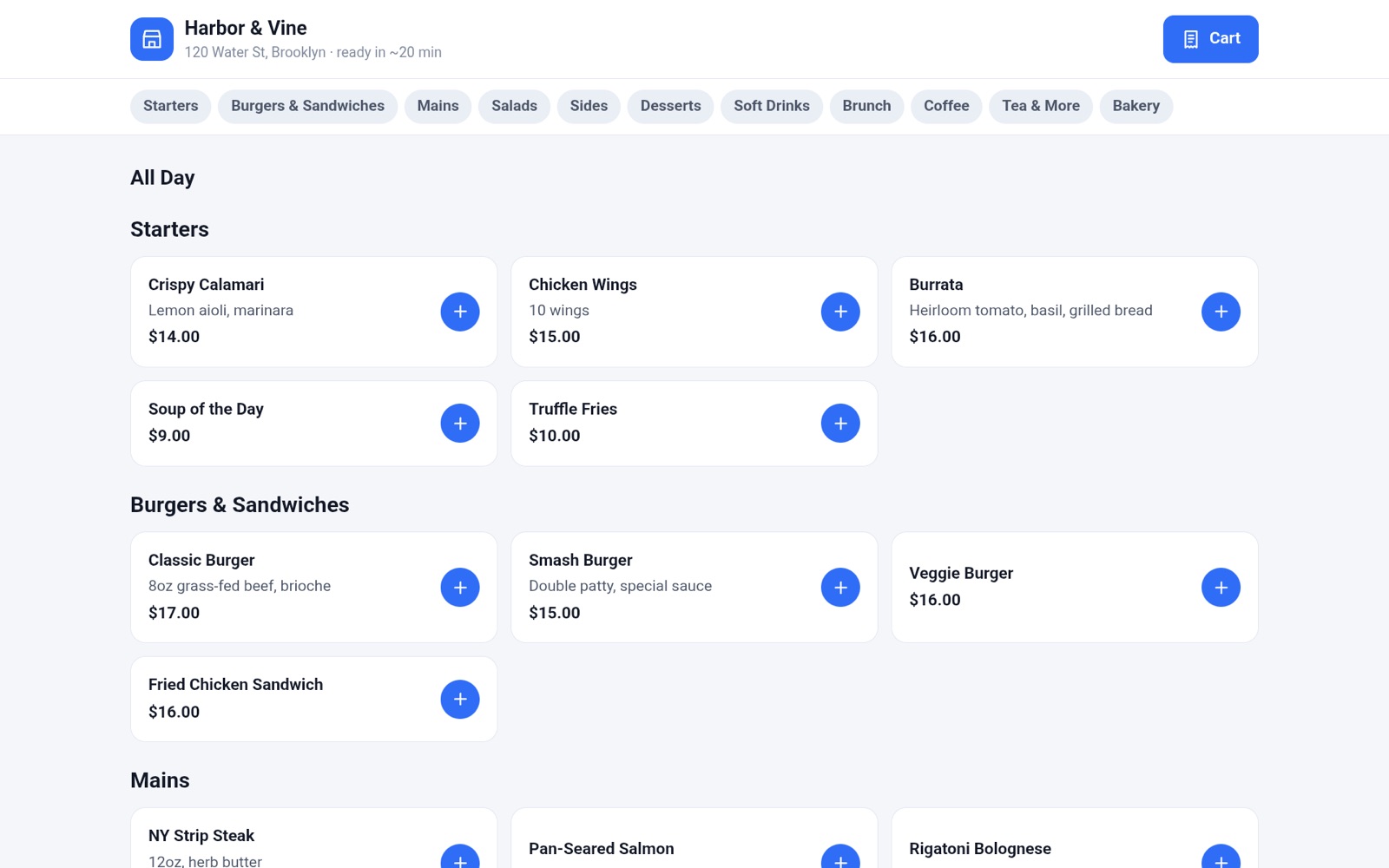
One menu for every channel

Your own online store and the delivery apps all run from the same menu. 86 an item once, and it's gone everywhere.

  • Online ordering for pickup and delivery, with your branding
  • DoorDash, Uber Eats and Grubhub orders print in the kitchen with the platform and customer name
  • Send your own delivery orders out with DoorDash Drive or Uber Direct couriers
  • Track every order from received to ready to picked up
The restaurant's online ordering page

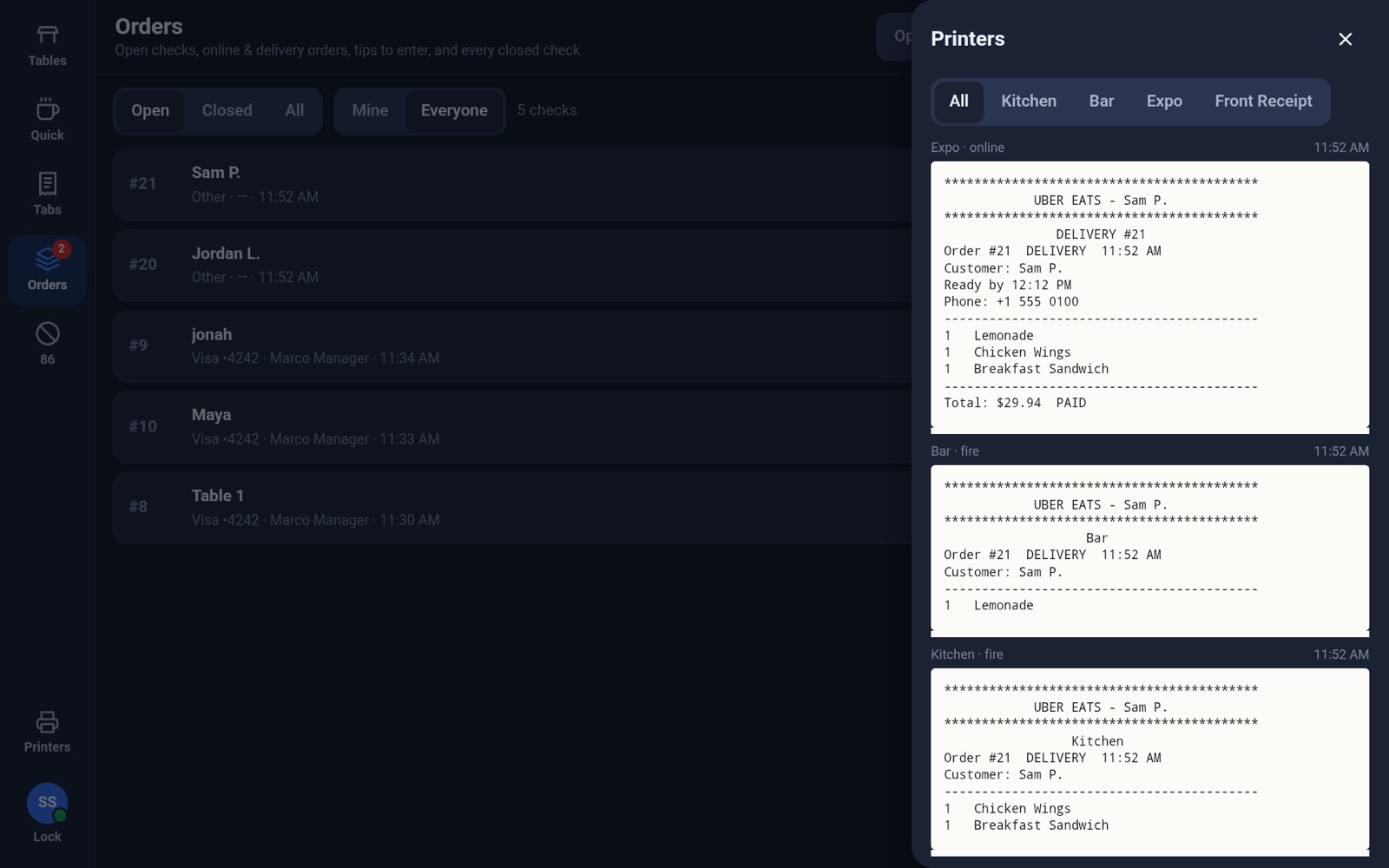
Tickets go where they belong

Route each item to the kitchen, bar or expo printer. Tickets are grouped by station and course, with seats, modifiers and notes spelled out.

  • Bag tickets for online and delivery orders, labeled with the customer name
  • Every ticket is viewable on any terminal, so nothing gets lost
Printer drawer showing kitchen, bar and expo tickets for an Uber Eats order

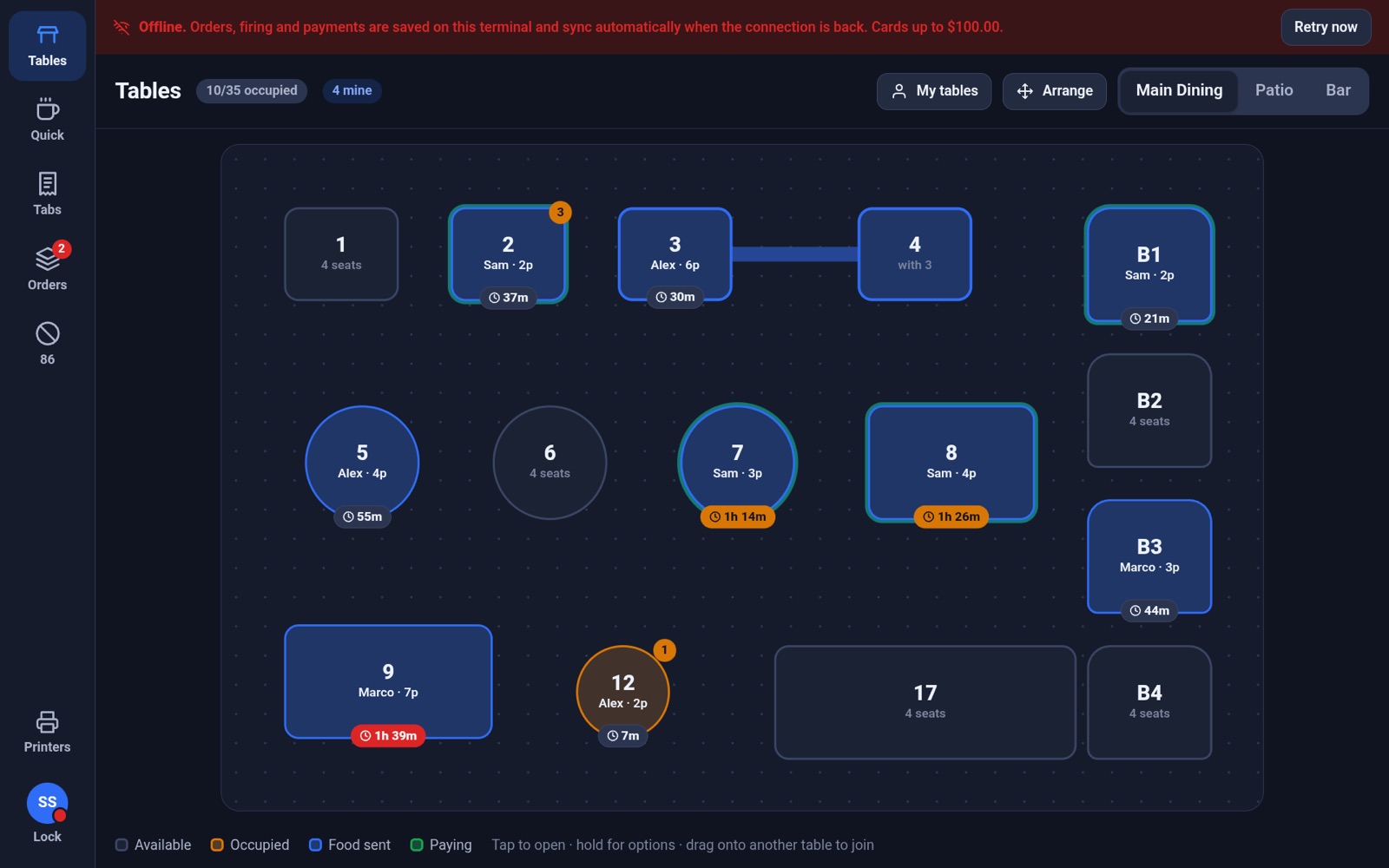
Offline mode

Internet down? Keep selling.

If a terminal loses the connection, it says so and keeps going. When the connection is back, everything syncs on its own.

  • Seat tables, ring items and fire tickets; the terminal prints them itself
  • Take cash, and cards up to limits you set
  • Staff sign in with their usual PIN; manager approvals still work
  • On sync, original times are kept and nothing reprints. Any problem, like a declined card, is flagged for a manager.
POS showing an offline banner while the floor plan keeps working

Owner dashboard

Know how the night went

A dashboard you can open from any browser, or from the tablet with a manager PIN.

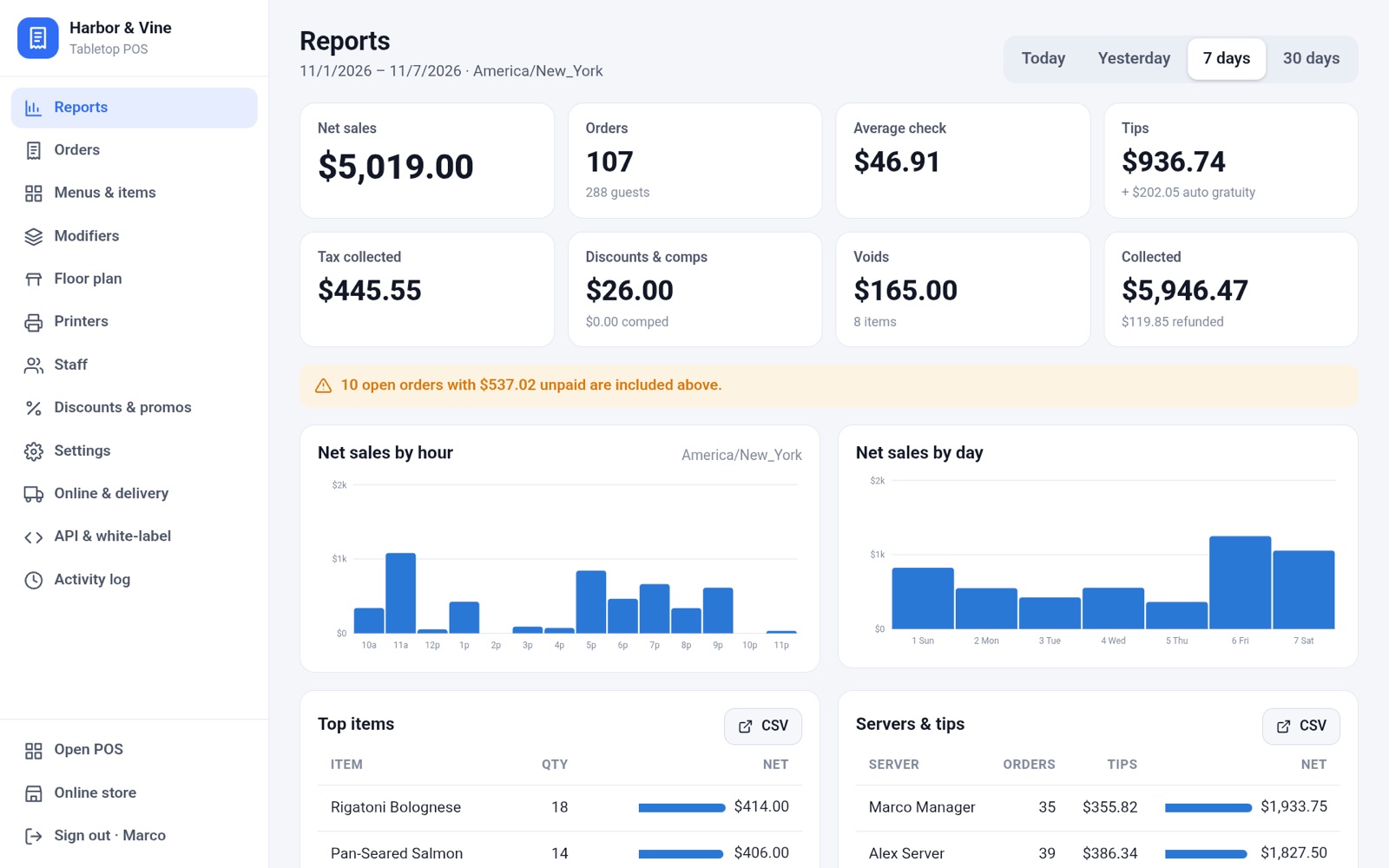
  • Sales by hour, day, item, section, server and payment type, with CSV export
  • Exceptions report: every void, comp, refund and discount, and who approved it
  • Menu, modifiers, floor plan, printers and staff editors
  • Business-day hours and automatic close-out
Reports: net sales, orders, tips and charts by hour and day

And everything around it

  • Tabs & card on file

    Open a tab, hold a card, close it at last call.

  • Manager approvals

    Choose which actions need a manager PIN: voids, comps, refunds, discounts, reopens.

  • Discounts & happy hour

    Preset discounts, scheduled happy hours and promo codes.

  • Every terminal in sync

    Two servers on one table never overwrite each other. Changes appear everywhere instantly.

  • Staff, roles & PINs

    Owners, managers, servers, bartenders, cashiers and kitchen, each with the right access.

  • Activity log

    Who did what and when, down to each void and who approved it.

  • Tax & gratuity

    Tax rates by category, auto-gratuity for large parties, tax-exempt orders.

  • 86 everywhere

    Out of salmon? Mark it once and it disappears from every terminal, the online store and the delivery apps.

  • Your brand

    Your name and colors on the terminal, the owner dashboard, the online store and sign-up.

For distributors

From signed to selling in three steps

  1. 1

    Set your brand and prices

    Apply for a distributor account, add your name and colors, and save price templates with your markup and fees.

  2. 2

    Add your merchants

    Keep prospects in the distributor portal, send them a demo, then turn them into merchants with everything filled in. Agents get their own logins.

  3. 3

    They activate, you earn

    The owner accepts your pricing, picks their terminals and pays. Every month they get one bill with our price and yours.

Developers & partners

Everything has an API

The terminal, dashboard and online store all run on the same public API, so anything they do, your code can do too.

  • REST API with an OpenAPI 3.1 spec, plus a WebSocket stream of live events
  • Signed webhooks for orders, payments, 86 and more
  • Partner API to provision restaurants and resell under your own brand
  • Offline sync protocol for building your own terminals
Seat table 8 and fire
POST /v1/orders
Authorization: Bearer pk_live_…

{
  "type": "dine_in",
  "table_id": "tbl_8",
  "guests": 4,
  "items": [{
    "item_id": "itm_burger",
    "modifiers": [
      { "group_id": "mgr_temp", "modifier_id": "mod_medium_rare" },
      { "group_id": "mgr_toppings", "modifier_id": "mod_bacon",
        "prefix": "extra" }
    ],
    "seat": 2
  }],
  "fire": true
}

→ 201 { "id": "ord_…", "number": 12, "status": "open", … }

Distributor pricing

Our price. Your margin.

These are SodiumPOS's prices to you. Add your own markup and fees on top, and your merchants get one monthly bill with both.

SodiumPOS

What we charge, per merchant location, per month

  • Plan, per location$49
  • Each register$29
  • Each kitchen display$15
  • Table service (floor plan, tables, coursing)$39

Try a merchant

$/ month
SodiumPOS$0
You keep$0
Merchant pays$0
Talk to us about pricing

Built to be resold

  • Set your own prices. Mark up any line (the plan, registers, kitchen displays, table service) and add your own fees, like a support plan.
  • Bring your own processing. Keep your payment processing relationships and residuals.
  • Your brand. Your name and colors on the POS, the owner dashboard and the online store.
  • One bill for the merchant. We bill monthly with our price and yours on one invoice, and show you every split.
  • Agents and sub-agents. Each gets their own login and sees only their own merchants.
  • A distributor portal. Prospects, demos, merchants, pricing templates, payment volume and a map of your portfolio.
  • We take the support calls. Merchants reach us directly, so your team can keep selling.

Merchant support

Your merchants call us, not you

SodiumPOS handles support for every merchant you sign. Real people answer, so a question at the start of a dinner rush gets answered during the rush.

  • Phone

    Talk it through with someone who knows the product.

  • Email

    For the questions that can wait for a detailed answer.

  • Live chat

    Quick answers without leaving the floor.

Live support from 9am to 9pm

FAQ

Questions, answered

What happens if the internet goes down?

Each terminal keeps working on its own. Servers keep seating tables, ringing items and firing tickets (the terminal prints them), and you can take cash, plus cards up to a limit you set. When the connection returns, everything syncs automatically with the original times. Card payments taken offline are charged at that point; if one is declined, the check reopens with the balance and a manager is alerted.

What hardware do I need?

An Android tablet for each terminal. The app runs full-screen, keeps the screen on, and can be set as the tablet's home screen so it's the only thing staff see. The owner dashboard works in any web browser.

How does distributor pricing work?

SodiumPOS charges $49 per month for each merchant location, plus $29 for each register, $15 for each kitchen display, and $39 for table service. You add your own markup to any of those, plus any fees you like. The merchant pays one monthly bill, and the distributor portal shows exactly what's yours and what's ours on every invoice.

Can I use my own payment processing?

Yes. Bring your own processing and keep your processor relationships and residuals.

Who supports my merchants?

We do. Merchants reach SodiumPOS support directly by phone, email or live chat, with live support from 9am to 9pm.

Can several servers work on the same table?

Yes. Every terminal sees changes immediately, and two people adding items to the same check never overwrite each other. A terminal shows who else has a table open, and you can turn on strict locking if you prefer one server per table at a time.

Do you work with DoorDash, Uber Eats and Grubhub?

Orders from those apps come into the POS, print in the kitchen labeled with the platform and customer name, and are tracked through pickup. Marking an item out of stock updates the apps too.

How do tips work?

Guests can tip on screen, or write a tip on the printed slip. Every paid check waits in the Tips list until it's closed out, so tips can be added or corrected first. Managers can close everything out at once, or have it happen automatically at the end of the business day.

Can I sell this under my own brand?

Yes. Your name and colors go on the terminal, the owner dashboard, the online store and the sign-up page. You can also provision merchants through the partner API.

Can my prospects try it before they sign?

Yes. Send anyone a demo from the distributor portal. They get a private copy of a sample restaurant to click through: the POS and the owner dashboard, with a real menu, floor plan and orders.

Can I get my data out?

Every report exports to CSV, and everything is available through the API, so you can connect your accounting or analytics tools.
Contact

Become a SodiumPOS distributor

Tell us about your business and we'll walk you through the distributor portal, pricing and onboarding.

  • A walkthrough of the POS, the owner dashboard and the distributor portal
  • Pricing, markup, fees and bringing your own processing
  • White-label, agents and API questions

Email us

Tell us a little about your business: how many merchants you serve and what you use today.

hello@sodiumpos.co

Test it out

We'll email you a link to your own demo: the POS, the owner dashboard and the distributor portal, loaded with a sample restaurant. Open it on a tablet, laptop or desktop.